REDION / Applications

Everything, one click away.

Explore each platform on its website. Application access is available there.

Applications8

Private applications5

The information websites are public. Only app access requires the private network or an approved account.

Websites5

MVP · Synthetic browser and Android emulator workflows verified2026

RediON Relay

Business requests, in flow.

My role

Product design · Android · Frontend · Workflow correctness

redion-relay
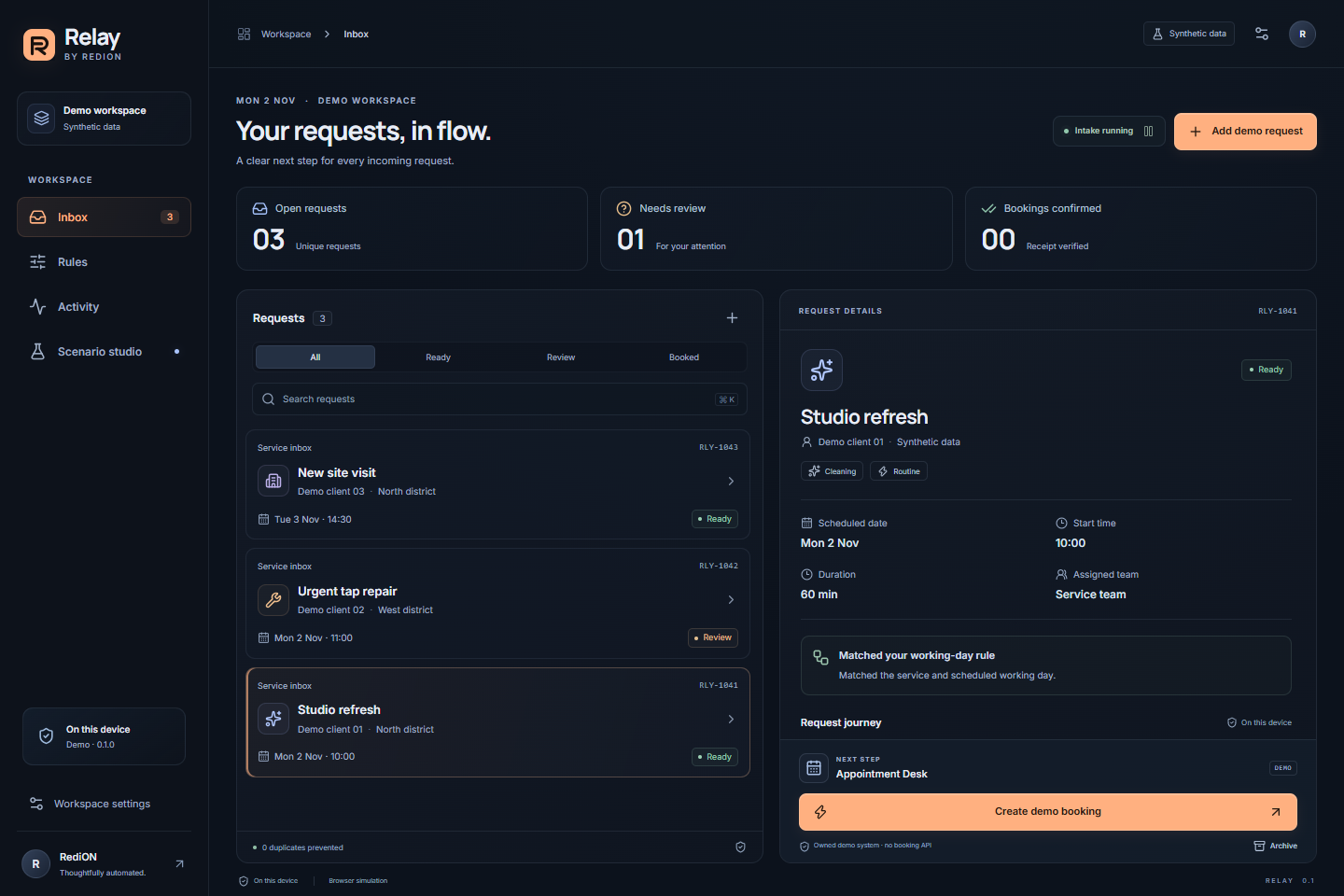
Actual browser sandbox: synthetic requests and rule decisions.
Video3 Screenshots

01

Project overview

Small service teams receive requests across apps, then manually decide who should handle them and when. Relay gives each request a structured place and a clear next step.

On-device intake classifies cleaning, repair and site visits. Seven weekday policies use the appointment date, working hours and assigned team. Urgent or uncertain requests stay available for human review.

The owned scheduling reference has no appointment-creation API. After an operator requests a booking, Relay fills its visible form and verifies the exact stored receipt. All demonstration requests are fictitious.
▶

Product walkthrough

02

Real product screenshots

Real product views, without mockups or stock imagery.

Actual browser sandbox: synthetic requests and rule decisions.
Actual browser sandbox: independent policies for every weekday.
Android API35 emulator: a matching receipt from the owned native reference desk.

03

System architecture

Selected intake

Explicit notification sources and consent; local structured data.

Weekly policy

Appointment weekday, service, working window and team.

Review workspace

Compact inbox, editable details and a bounded activity history.

Verified action

Reserve once, operate the owned form, match the receipt.

04

Project status

Built

  • Compact English/German interface with desktop and phone layouts
  • Seven editable weekday policies and manual request review
  • Android background notification intake with separate source consent
  • UI-assisted native and browser reference bookings
  • Duplicate handling, overlap rejection and persisted attempt reservations
  • 64 TypeScript tests, 24 Kotlin tests and 10 browser workflows passed

In active development

  • Physical-device and OEM background-behaviour acceptance
  • Customer discovery and a narrowly authorized business pilot

Planned

  • A separately reviewed adapter for a customer-owned scheduling system
  • Operational retention, deletion and multi-user coordination requirements

05

Engineering decisions

Why a local-first inbox?

Selected request content stays on the device. The MVP has no cloud account, telemetry or Android Internet permission.

Why UI-assisted scheduling?

Some authorized legacy systems expose a usable form without a booking API. The reference demonstrates this boundary with a real form, not a simulated success flag.

When is an action successful?

Only an exact matching receipt counts. A click, conflict or interrupted attempt cannot silently become a booking.

06

Challenges solved

  • 01Keeping browser simulation distinct from Android service evidence
  • 02Preventing replay after interruption or an uncertain outcome
  • 03Making weekday rules understandable in a compact mobile workspace

07

Technology stack

Interface

  • React
  • TypeScript
  • Motion
  • Lucide

Android

  • Kotlin
  • NotificationListenerService
  • Scoped Accessibility
  • Offline WebView

Verification

  • Vitest
  • Playwright
  • JUnit
  • Shared policy contract

08

What it demonstrates

A real Android notification produced a structured request and a confirmed native appointment. A second overlapping attempt was rejected without creating another appointment.

Who this is relevant for

For small service businesses that need an authorized request-routing workflow and a carefully scoped scheduling integration.

Need a similar system?

I can design and build a solution around your workflow, team, and business goals.

Discuss your project ↗